
What We're Actually Using AI For (Vol. 4)
Learn we're using AI for and how to make it work for you too.

We’re back with Volume 4 of what the VAILL team is actually using AI for — no hype, no demos designed to impress, just the real stuff. This installment covers a range of use cases that might surprise you with how unglamorous they are: building dashboards that replace slide decks, setting up custom instructions so AI can work the way you work, and using AI as a structured data entry assistant for a massive multi-jurisdictional research project. What these use cases share is that none of them require you to be an AI power user or a developer. They just require a task worth tackling and some willingness to experiment.
As always, we want to hear from you. If you’re using AI in ways that are actually making your work easier — boring, practical, and repeatable — share them with us through our Google form. We’d love to feature your wins in a future volume.
Don’t forget to check out our previous editions to see other use cases!


Death by PowerPoint is Optional — Cat Moon
Death by PowerPoint is optional. One of the most unexpectedly delightful experiments I’ve been running is using AI (Claude Code) to build interactive HTML dashboards in place of slide decks — and I’m not going back. The process is simpler than it sounds: share your data, describe what you want to communicate, and let the AI generate a clean, dynamic, visually compelling dashboard you can present live and hand off as a takeaway. No design skills required. At a recent presentation to legal recruiters and professional development leaders, for example, I used a dashboard to explore AI’s impact on the law firm business model and what it could mean for hiring — the kind of nuanced, data-rich conversation that slide bullets simply can’t hold. Attendees could see relationships between data points at a glance, and they walked away with something they could actually use, not just a PDF of slides. For anyone presenting research, survey results, or emerging trends, this is worth experimenting with. The barrier to entry is low, and the payoff — for you and your audience — is real.
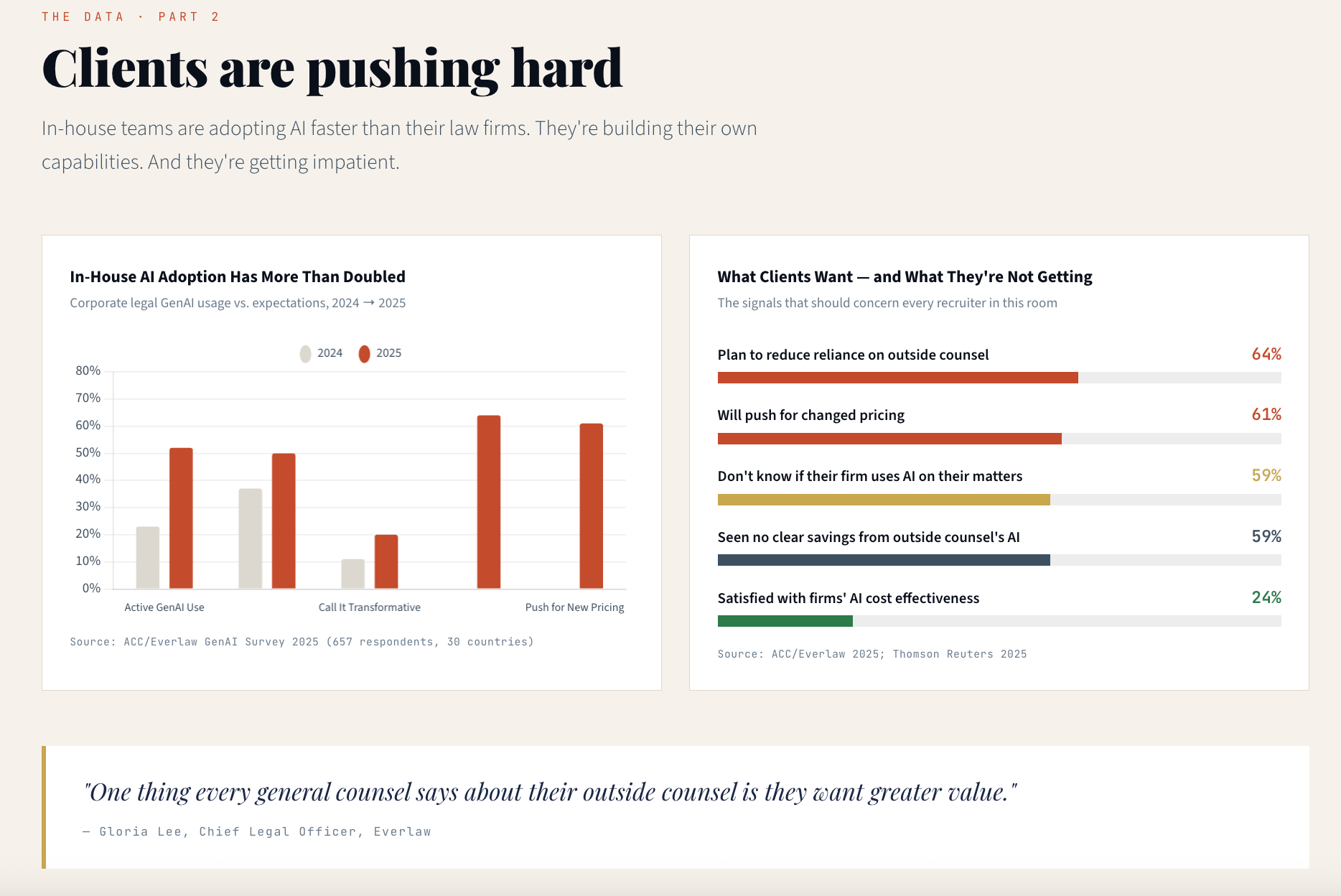
How do you make this work for you? Start with the story you want to tell, not the format. Before you open any tool, ask yourself: what do I want my audience to understand, and what relationships in this data matter? Feed that framing to the AI alongside your data, and let it generate the structure. You don’t need to know how to code — you need to know what you’re trying to communicate. The tool handles the rest. And when you’re done? Your audience walks away with something they can actually use, not just a PDF of slides they’ll never open again.
Claude as Collaborator, Not Just Tool — Emily Pavuluri
I’ve been using custom instructions in Claude across several workflows this year: building a slide deck template for my AI-Augmented Legal Research course so each week’s presentation stays visually cohesive, creating a processing system for monthly library statistics that I can trigger with a single sentence, and establishing brand guidelines for VAILL so that any content I generate, from LinkedIn posts to course handouts, stays on-voice.
These instructions are far more detailed than anything I would have written from scratch. They came together by sharing existing materials with Claude and asking it to identify the patterns and preferences already embedded in my work. All that excellent documentation you have, from past presentations, published posts, and existing brand assets, can be used by Claude to reverse-engineer what ‘on-voice’ and ‘on-brand’ actually looks like. The setup is most of the work, but it’s worth every minute, especially week to week, when I can spend more time developing the content for my slides and less time on trying to make them look the same.
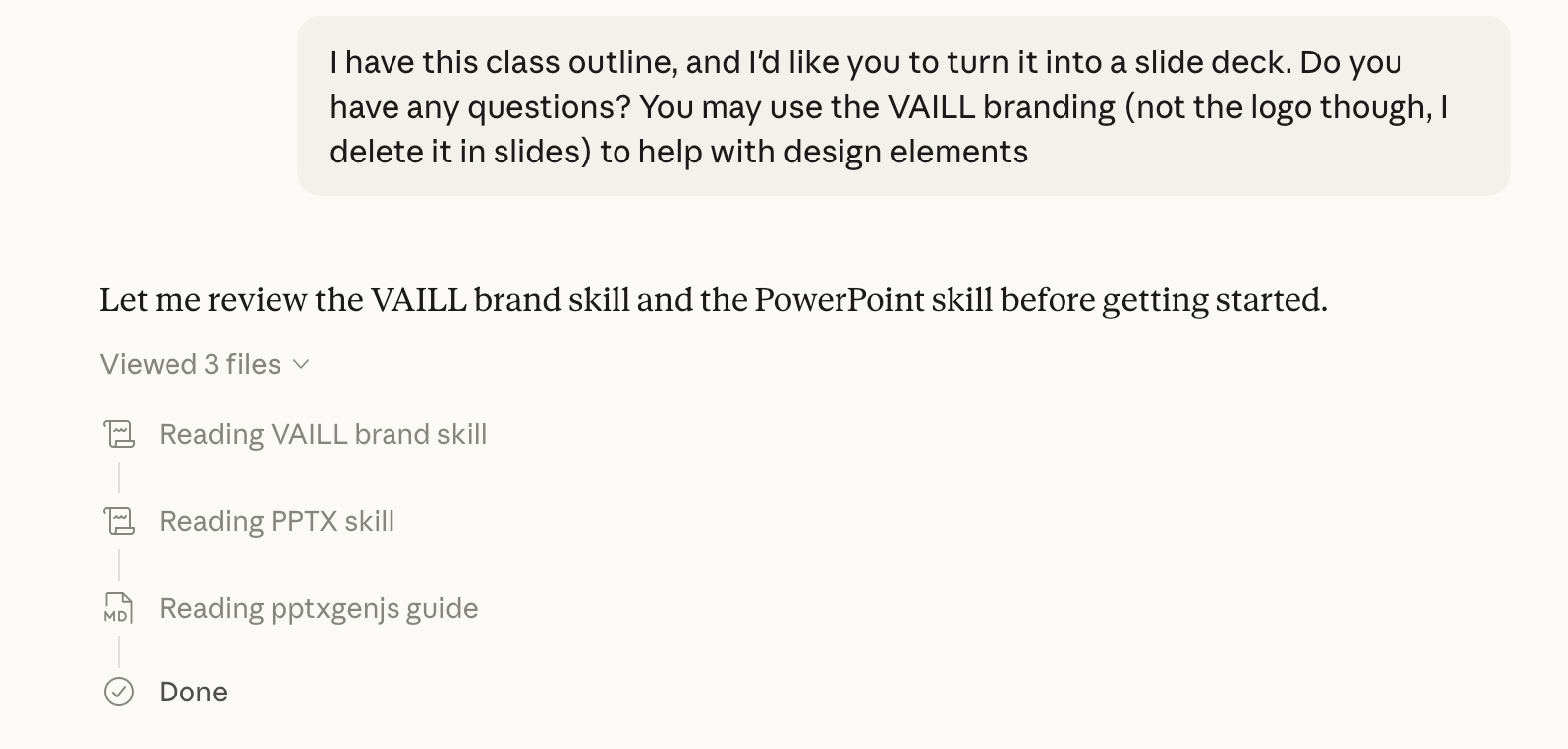
What I didn’t expect was that I’d be asking Claude to help me write the instructions for Claude. I didn’t craft these from scratch. I described my goals, shared examples of our existing materials and LinkedIn posts, and Claude synthesized those into a set of instructions that it can now follow consistently. Claude essentially drafted its own operating manual for our work together.
This meta-layer is still a little mind-bending. I know we’ve all asked ChatGPT or Claude, especially in the early DR days, how to ‘write’ a good prompt for the tools to use, but it still seems a bit strange to me that I can ask a tool how best to use itself. But it’s one of the best examples I can point to of AI as a genuine collaborator rather than just a tool. I knew what I wanted; I just needed help articulating it in a way an AI could reliably use. Turns out, that’s a pretty good description of effective AI prompting in general.
How do you make this work for you? The upfront investment is the whole point. Spend real time building your custom instructions: describe your goals, share examples of work you’re proud of, and let the AI synthesize those into a set of guidelines it can follow consistently. Once that’s done, the ongoing payoff is significant: you stop reinventing the wheel every time you sit down to create something. And don’t try to write the instructions alone. Describe what you want to Claude, share your existing materials, and ask it to draft the instructions for you. It’s a strange loop the first time, but it works.
AI as Research Assistant for the Unglamorous Work — Kyle Turner
In a recent project, I used Claude CoWork to help organize and operationalize a large body of existing legal research. The task resembled building a 50-state survey examining how each jurisdiction handles aspects of conservatorship proceedings. I had already gathered 20–30 authoritative secondary sources, including comprehensive guides, statutory summaries, and jurisdictional analyses, and was working from an Excel spreadsheet containing hundreds of specific data points we needed to capture, ranging from yes/no procedural questions to direct statutory citations. Rather than manually extracting and entering that information, I asked Claude CoWork to review the spreadsheet structure and populate each cell using the research I had compiled. In minutes, it completed work that would otherwise have required many hours of repetitive data entry.
I then extended the workflow. Because the spreadsheet was intended to be collaborative and transparent, I wanted every data point tied directly to publicly accessible primary sources. On a second pass, I provided Claude CoWork with the completed Excel file and asked it to locate official state code websites and embed links to the relevant statutes within the corresponding cells. This was not AI conducting independent research or generating new analysis. Instead, it performed structured data organization and source linking based entirely on materials I had already curated. The result was a clean, citation-linked, collaboration-ready 50-state resource completed in a fraction of the time required for manual processing.
How do you make this work for you? This approach works best when you’ve already done the intellectual heavy lifting. AI isn’t conducting the research here: you are. Gather your authoritative sources, define your data structure, and then use AI to do the mechanical work of extraction, organization, and source-linking that would otherwise eat hours of your day. Think of it less as “AI doing research” and more as “AI as a very fast, very patient research assistant who never complains about repetitive data entry.”
This volume’s use cases share a common thread: we’re using AI to work smarter on existing tasks, not to invent entirely new workflows. Whether replacing slide decks with interactive dashboards, building custom instructions that make AI a genuine collaborator, or turning hours of repetitive data entry into minutes of structured output, these applications are about removing friction from work we were already doing.
None of these required a big dedicated AI budget, a technical background, or a complete overhaul of how we work. They required knowing what was slowing us down and being willing to try something different. Invest some time into thinking through what is bogging you down and experimenting with different solutions — that’s really where AI can shine.
So, what are you using AI for? Share your use cases with us through our Google form. We’d love to feature your practical wins in a future volume, especially if you’ve tried out one of our use cases!
And what's next for the Substack this year? We've got a lot coming your way. Kyle and I are working on a post about a new class we taught together this semester, plus sharing updates on programming we're currently developing. And, for those of you who read last year's AI legal research post, we have an update on that too. Spoiler: the kids are still alright. If you missed out on those posts, catch up before we drop the updates!

